


Ah, the new year! February begins the new fiscal for many organizations, and it’s a fine time for resolutions and spring cleaning. You know, fun stuff like dumping recurring meetings, washing the windows, tech debt hackathons, or rearranging the living room. Here’s a fun spring cleaning activity to consider: review, sort, and maybe stop the alerts that are being generated. Alerts can cost a lot of money to generate, especially with anomaly detection, and if they’re not being looked at or not providing enough value, they should be turned into metrics instead.
And so on to my favorite thinking tool, the simple quadrant. Let’s use impact of the alerted event to customers, and the responder’s ability to resolve. Of course both of those have fuzzy edges: how many customers, which customers, how bad’s the impact, which responder, are we talking “easily” resolve or “could theoretically in a perfect world with no distractions” resolve… but we’re trying to keep it simple.
- Horizontal axis: no impact to customers, current impact to customers. Theoretical future impact can be ignored in this model.
- Vertical axis: cannot be resolved now, or immediately actionable.
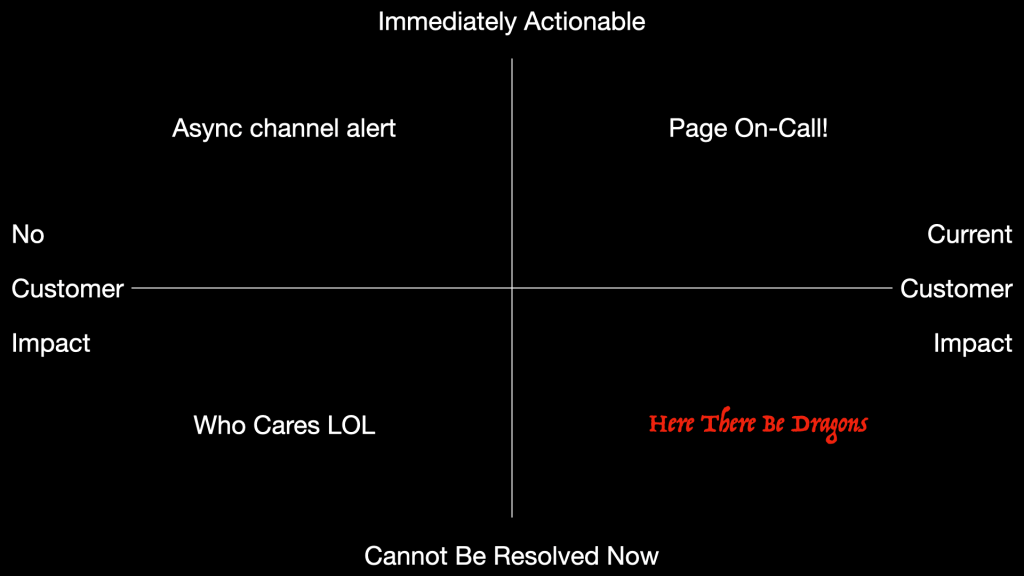
- Upper right: Page On-Call!
- Upper left: Async channel alert for eventual response
- Lower left: who cares lol
- Lower right: here there be dragons
Lower left is the easiest. No customer impact, and you can’t do anything about it anyway. Anything in here should not be monitored at all, it’s already effectively suppressed even if no one’s clicked a button to suppress it, because nothing is happening as a result of the alert. If it’s going to where people see it, it’s just annoying them and wasting your investment. Examples include self-resolved service bounces, backpressure on queues that the responding team can’t adjust, vulnerability findings that the team can’t patch. Great stuff to fix in a tech debt reduction drive, but why monitor and alert anyone about it?
Lower right corner is also pretty easy. Anything in here is an automatic incident, with potential to end up as a reference for others on the Internet. There should be a process, incident commanders, handoffs, executives, vendors, the whole thing.
Upper right can be a bit more nuanced. Ideally these are just runbooks, possibly on their way towards automation if that’s how you roll. There’s customer impact, it’s urgent, but it’s routine. Examples might be a downed service that requires manual intervention to clear up its state before it can restart, an expired certificate, a cluster failover that needs some handholding.
In the upper left, we have lower priority versions of the same… runbooked activities that don’t have any real urgency and can wait for business hours. Maybe a backpressured queue or a memory-pressured service could use rebalancing, maye that certificate renewal needs to happen in the next week, maybe a medium-sized vulnerability could be patched in the next maintenance window. So these go to a ticket system, or a Slack channel, or whatever.
After organizing your monitors into these categories, the next step is to apply pressure to them.
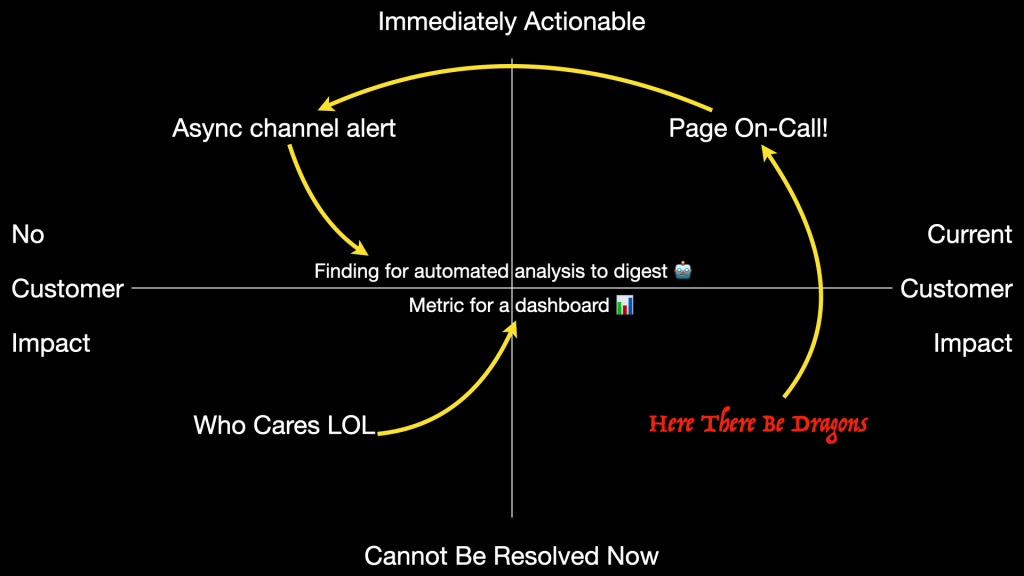
Are any of the full-blown incidents you’re dealing with something that could be de-escalated and handled by on-call instead? Probably not if your organization and infrastructure is healthy, but if not… excessive incidents are a mandate for action. Aside from the customer impact, they’re exhausting and expensive and avoiding them is a good thing to spend time on.
Next, can you de-escalate any of the existing on-call load? Maybe a backup system or a touch of automation can keep the wheels on until the responsible team wakes up. Reducing the urgency increases the sustainability.
Finally, look for alerts that should really be metrics or findings. If the SRE / Infra / DevOps / Scrum Squad team can’t do anything about it right now, then it’s not an alert. Maybe the event is interesting, maybe it can tell you something useful, and maybe it could be used to power an actual alert. But it’s not a thing to alert over in itself.
It’s worth noting this whole chart is your known knowns; the situations you’ve decided to monitor. Also the size or scope of this chart is defined by resource capacity.
- If you can’t afford to ask the question, it doesn’t get asked.
- If you can’t afford to act on the answer, it doesn’t get action.
This painful syllogism is what leads small businesses to have inadequate security, poor observability, and a “do more with less” culture. If that doesn’t describe your organization, that’s great. Then maybe you can also afford to think about the unknowns. Look for near misses and see what you can learn.
 Monkeynoodle.Org